Everything is a transaction in PostgreSQL. So what?
Every statement you run in PostgreSQL is inside a transaction, either explicitly or implicitly, and this may ring a bell. But let’s focus on this matter and see what is going on, as this single architectural choice dictates why, for example, your COUNT(*) queries are slow, why your database disk space mysteriously balloons, and why dead rows might be haunting your storage.
The question
First, I’d like to draw your attention to this section of PostgreSQL’s official documentation on transactions.
PostgreSQL actually treats every SQL statement as being executed within a transaction. If you do not issue a BEGIN command, then each statement has an implicit BEGIN and (if successful) COMMIT wrapped around it. A group of statements surrounded by BEGIN and COMMIT is sometimes called a transaction block. (source)
But there are some questions about this matter. What does it mean, and should we care about it? What effect does this have on the performance of our queries? What made genius PostgreSQL engineers think of this?
Transactions
Let’s begin by defining what a transaction is, though it may sound obvious to you, and you may find this discussion pointless. I recommend you bear with me and stay around as we go deeper, step by step. Transactions are considered one of the most fundamental features of many modern databases. Transactions are used when you want to perform a series of operations like multiple updates, multiple deletions consisting of multiple reads and some logic, etc., in an atomic manner - that is, either all of the operations in that transaction must be completed successfully, or in case of any error or withdrawal, all the operations must be rolled back as if nothing had happened.
No Dirty Reads
By design, PostgreSQL never allows dirty reads to happen. What is a dirty read? Dirty read is the situation when a transaction reads data which is created/modified/deleted by another transaction, but it has not committed yet. For example, imagine you start a transaction that deletes the row with id = 1 from table X, but you do not commit your transaction. At this moment, if your friend starts another transaction (either explicitly or implicitly - doesn’t matter), he/she would not be able to find out that you have deleted that row, since you have not committed your changes. So any change is hidden if not committed.
In some other database systems, dirty reads can happen, and dirty reads can be omitted by using a correct transaction isolation level (we are not going to discuss transaction isolation levels, since it is out of our scope). Hence, PostgreSQL never allows dirty reads, no matter what. So it’s time to wonder how PostgreSQL prohibits dirty reads and what is different about PostgreSQL.
Let’s start our discussion by preparing an example. Imagine we have a table named bank_accounts. Let’s define this table as simply as we can:
And its content:
| username | balance |
|---|---|
| alice | 400 |
| bob | 50 |
In PostgreSQL, every row is considered a tuple. This table consists of only two tuples: (alice, 400) and (bob, 50).
Besides, tuples are immutable in PostgreSQL. Wait, what? You cannot edit or replace tuples; you are only allowed to add or delete tuples. Obviously, in reality, you yourself cannot and don’t perform deletion and insertion of tuples. This operation is done by PostgreSQL internally.
At this moment, you may wonder:
- If rows are immutable, how can PostgreSQL do
UPDATEstatements…? - Why does all this information seem cluttered and useless?
- Why should I actually care?
MVCC
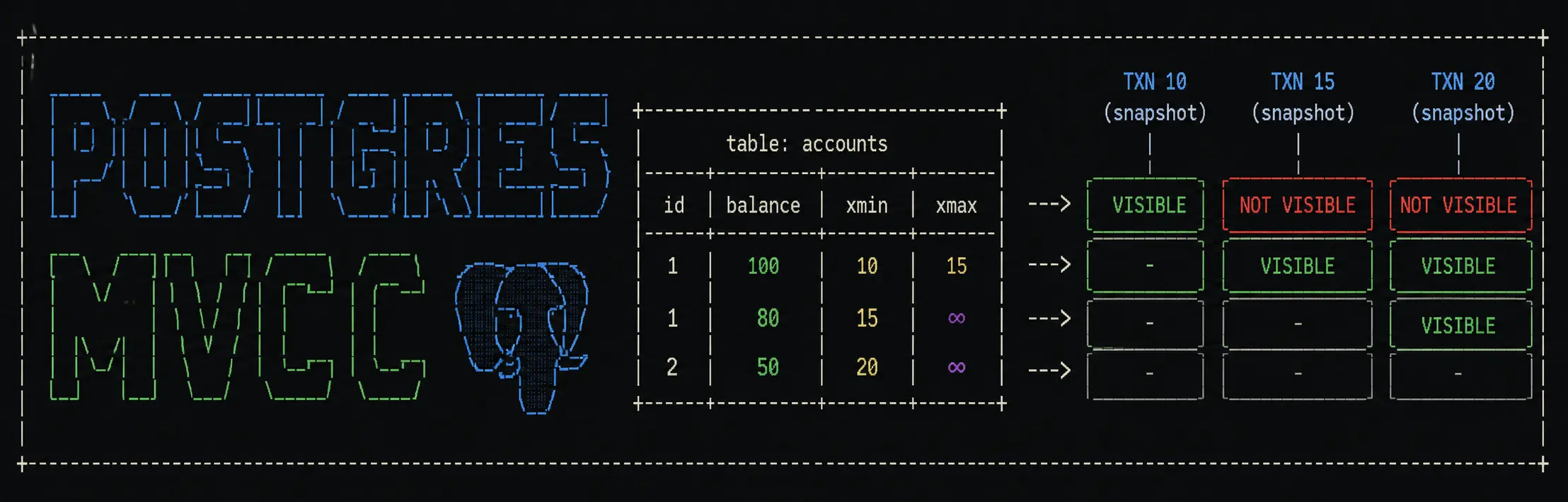
This is where it gets interesting as we now focus on how PostgreSQL handles transactions. PostgreSQL ensures transaction isolation by a technique named Multi-Version Concurrency Control 1, which we will refer to as MVCC from now on. Let’s see how this technique works in action.
Transaction ID
Any transaction you run in PostgreSQL has a 32-bit unique transaction ID, which is referred to as xid. You can get the ID of the current transaction in PostgreSQL using the txid_current() function:
Keep in mind that this number is incremented sequentially. If you create another transaction at the same time, you will get 9574.
xmin & xmax
Alongside each tuple in a table like bank_accounts, PostgreSQL also keeps two transaction IDs as xmin and xmax. Every row has xmin (the transaction that created it) and xmax (the transaction that deleted/updated it). Readers never block writers and vice versa — they just see different versions of rows based on a snapshot of which transactions were committed at a given point. Huh?
Consider our previous table with xmin and xmax beside the tuple:
| xmin | xmax | username | balance |
|---|---|---|---|
| 2 | 0 | alice | 400 |
| 8 | 0 | bob | 50 |
Here, the value xmax=0 means that no one has deleted the corresponding tuple. xmin=2 means that the corresponding row is created by a transaction with id equal to 2.
Now, if you try to update Alice’s balance by a transaction ID (xid) equal to 12. Your table will look like this:
| xmin | xmax | username | balance |
|---|---|---|---|
| 2 | 12 | alice | 400 |
| 8 | 0 | bob | 50 |
| 12 | 0 | alice | 700 |
Also, let’s delete Bob’s account with xid = 23 and see what happens:
| xmin | xmax | username | balance |
|---|---|---|---|
| 2 | 12 | alice | 400 |
| 8 | 23 | bob | 50 |
| 12 | 0 | alice | 700 |
You cannot read uncommitted data
Now let’s see how PostgreSQL uses this information to decide on which row is visible in a specific transaction. PostgreSQL always prohibits reading uncommitted data (rows that are created/modified/deleted by a transaction that is not committed yet), or better said, there is no way a dirty read can happen. The secret lies in xmin, xmax, and xid.
In a specific transaction with transaction id = xid and a specific row, PostgreSQL enforces the following criteria for each row to decide if it’s visible or not:
- If
xid < row.xmin, that row is NOT visible, because these rows are added after you started the transaction. - If a transaction with id equal to
row.xminis rolled back, that row is NOT visible, because the insertion of a new tuple was aborted. - If
xid >= row.xmaxand a transaction with id equal to row. xmax is committed, that row is NOT visible, because that row is already deleted. - Any other row that does not fall into previous conditions is therefore visible.
Let’s see this in action with a Python code snippet that overly simplifies the whole process:
 1def is_row_visible(xid: int, row: row) -> bool:
 2    if xid < row.xmin or transaction_is_rolled_back(row.xmin):
 3        # You don't see tuples from later transactions that are added
 4        # You also don't see added tuples from later transactions that are never committed
 5        return False
 6
 7    if xid >= row.xmax and transaction_is_committed(row.xmax):
 8        # You don't see tuples from the past that are deleted
 9        return False
10
11    return True
So, using this technique, dirty reads cannot happen in PostgreSQL (thankfully).
Vacuuming
Clearly, this MVCC approach creates a lot of redundant tuples that need to be garbage collected as we constantly copy tuples for each transaction, modify their transaction metadata, and vanish.
PostgreSQL deletes invalid and redundant rows (tuples) using a utility called VACUUM 2. By default, PostgreSQL vacuums periodically, which is called the vacuuming process (autovacuum daemon 3). To be honest, a lot is going on with vacuuming in PostgreSQL that can be discussed later.
Why does this matter?
Now that we know what MVCC is, stick with me to see why it’s nice to know about MVCC and have a few considerations.
Dead tuples accumulate
As mentioned above, every UPDATE and DELETE leaves the old tuple behind. It doesn’t get cleaned up immediately. Over time, this bloats your tables and indexes. Vacuuming is the process that cleans these dead tuples up. If the vacuum can’t keep up (as of high write load, or a long-running transaction pinning old rows), your table grows even if your actual data doesn’t. So…
As an engineer: never leave long-running transactions open — they block vacuum from cleaning anything committed after them.
Long-running transactions are dangerous
A transaction that stays open for hours forces Postgres to keep every dead tuple from that point forward, because some other query might need to see the old version. Keep transactions as short as possible.
SELECT FOR UPDATE is sometimes necessary
MVCC gives you a snapshot, but snapshots are point in time. Two transactions can both read the same row, both think they’re the only ones acting on it, and both write — the last write wins.
When you need to read-then-write, use
SELECT FOR UPDATEto lock the row, or use serializable isolation.
SELECT COUNT(*) is slow
You may want to think about this on your own, but basically, counting all tuples in a table requires keeping track of all ongoing transactions before reporting a solid number. This is due to the fact that there is no single current number of rows in a table, and PostgreSQL will traverse your table one record at a time to make sure if it counts or not. This is the reason that such a query is extremely slow on large databases.
Quiz
If you want to make sure that you fully understand how MVCC visibility works, let’s have a quick review. Imagine we are querying the bank_accounts table. For each question, think if the row is visible or not.
You see a row with xmin=5 and xmax=0. You know that transactions 1 through 5 are committed. Will you see the row?
You encounter a row with xmin=5 and xmax=9. Transaction 5 is committed, but transaction 9 is in progress. Will you see the row?
You reach a row with xmin=5 and xmax=9. Transaction 9 is committed. What about now? Is it visible?
You see xmin=12 and xmax=0 for a row. Transaction 12 is still in progress. Do you see this row?
You find a row with xmin=12 and xmax=15. Transaction 12 is committed, but transaction 15 is rolled back. Will you see this row?
Tricky one: there is a row with xmin=20 and xmax=0. Transaction 20 is rolled back. Is this row visible in your query?
Answer
Yes (assuming your transaction started after transaction 5 committed). Transaction 5 is already committed and therefore visible.
Yes. Transaction 9 is yet to be committed, and we are not sure what will happen to this row. It is visible since in transaction 5, this row was committed.
No. Transaction 9 has deleted the row.
No. We would see it after transaction 12 was committed.
Yes. It’s created in transaction 12, and it’s not deleted in transaction 15.
No. Transaction 20 is rolled back. So there is no way to see this tuple.